Domestic Phone Usage
This is easy as there is no need for foreign upgrade (international plans), data fees or making sure your phone will actually work in a foreign land. The main two things I use a lot when I am traveling is phone services (duh) and data (another duh). Seems basic today, but you do need both unless you want to carry a map and have to use expensive hotel phones. I use a whole lot more data than phone calls when traveling for pleasure or business. To help plan any trips route I use either Maps or Google Maps.

Most people just use these apps for driving a car, but the neat thing about them is that, in addition to driving, you can also select time and directions if walking, using public transportation, a ride service, bicycling, or by plane. Amazingly, (yes, I think it is amazing) that within seconds you can quickly explore your travel options with the time it takes and cost. Because traveling to destinations most often is the balance between how long it takes to get somewhere versus the cost decreasing travel time. The only other major issues are weather concerns, timing options (usually frequency of travel not enough to meet arrival time requirements), personal issues (physical limitations).

I arrived at the Heathrow Hilton at 9 am having traveled overnight. I was scheduled to start training the next morning so had the rest of the day to myself. My colleague from the US was traveling on a different flight and it was delayed for several hours. So I had two options…stay at the Hilton (and likely fall asleep) or keep moving. I picked up my phone and used Google Maps to see how difficult it would be to get to Windsor Castle. Quickly I was able to know where to catch the #87 bus from Heathrow and be deposited directly in front of Windsor Castle. I had a great day sightseeing the castle and still had time to join my colleague for a quick pint upon his arrival.
International Phone Usage
As with most travel internationally, using your mobile phone also requires planning. Check with your carrier to ensure that your phone model is able to use cell signals internationally. They should be able to tell you if your phone will work in Europe, Africa or Asia.
Secondly, check to see if you need to add on international service to your plan for the dates that you are traveling. I would always add a few days just in case of delays.
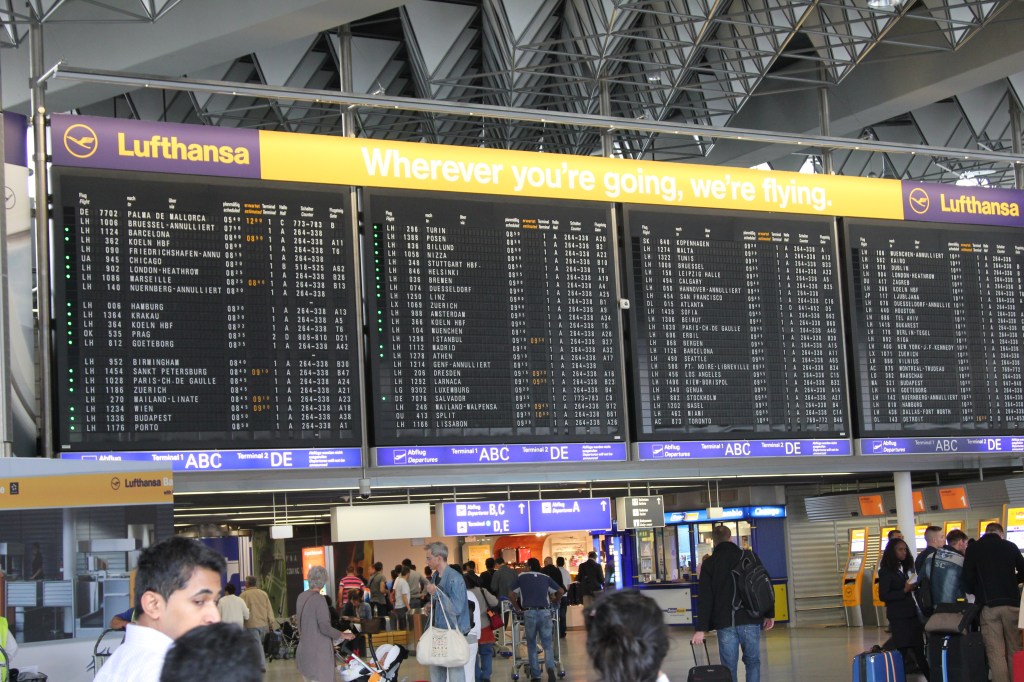
I had a flight out of Barcelona connecting in Frankfurt and then on to the US. Unfortunately, my flight from Barcelona was delayed over 1.5 hours getting into Frankfurt, but the flight attendant assured me American Airlines knew about the delay and would wait for the incoming flight. Once in Frankfurt I had to switch terminals, which required me to go through customs to enter Germany then almost immediately re-lineup to go through customs to leave Germany in the American Airlines terminal. Once this was accomplished and I ran to my gate where I was informed the flight to the US had already departed. I asked what is the next flight to the US they informed me that the American computers were down so there were NO more flights from ANY carrier heading to the US for the remainder of the day. The attendant directed to go to my original carrier for further assistance in Germany. For the third time that day I went back through customs to re-enter Germany to work with carrier to get me a room for the evening. The next day I once again left Germany and made it home. Having a working phone made this travel nightmare much easier on me and my family, and having a couple extra days of international coverage in case of these type of issues can lower your stress level.
If your carrier has international service included in your plan, still ask about data rates and costs. I have recently been using T-Mobile and their ONE Plan in which international service is included in the domestic plan. This was great until I was actually traveling Europe and found that the data rate under the ONE plan was in my view, pathetic. When using maps even with LTE and 4 bars the phone would grind away and finally bring up the data requested. This not only increased our frustration but drained the phones batteries even quicker. Afterwards, we learned that for only $X dollars per day we could have had high speed data. How nice! (yes, indeed sarcastic)
Know costs for calls and text messages. Unless you pick an international plan with unlimited text and phone you should know your call rates (e.g. $2.35 for first minute and $0.35 for each additional minute), text message rates ($0.20 for outgoing texts and $0.05 for incoming) plus data blocks may come in 50 meg packs (e.g. $25 for each 100 meg of data). This is important for both business and pleasure. Unless unlimited, sending a US friend a large pixel picture from every site visited can chew up data and may result in a hefty surprise when returning home. Likewise, if you or your friends decide to send you texts every 5 minutes because they text via stream of consciousness then you may also build up a nice bill 5-20 cents at a time. Unless business or personal emergency demands it, I try to batch my emails, pictures and texts when I am in a WIFI hot zone. I also like to take advantage of apps that use VOIP (Facebook Messenger, SKYPE, etc.) to call friends from free WIFI zones to avoid all possible phone charges.

I traveled to Rwanda Africa to help oversee a commercial being made about the mountain gorillas. I was told by my office that I would NOT have phone or data coverage while in Rwanda but rather try to use WIFI via the hotels to send emails, spreadsheets, images, etc. However, when I landed in Rwanda and turned my phone off of airplane mode, it captured a local carrier and started pinging away sending and receiving data. Of course, I also took a selfie of my arrival at the airport and sent it to my family. About 5 minutes later I got a notice from Verizon that I had incurred over $1500 in fees for data. Luckily, my office was able to work something out with Verizon as I thought my phone WOULDN’T work, not that I shouldn’t use it. Crazy thing was that we spent some time with a local guide who let us use his phone’s hotspot as he had unlimited data. This was a big lesson (I had some explaining to do) to know data and to know rates by country as they can vary greatly.
Extra Battery Power
The final thing I would recommend to have for travel is your USB phone charger cord and an extra battery. Typically, we end up charging the phone twice daily given the usage of Google Maps, photos, and other usage. So we always carry 1 or 2 stick type battery packs. They are easy to keep in your pocket and keeps you from looking down and finding it at 5%. That can be an Oh S@*! moment.



 The Sane Adventurer
Leave a comment